优先服务
优先服务



软件介绍
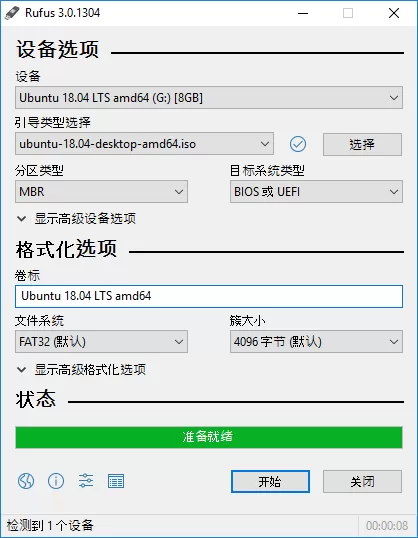
Rufus是一款小巧、实用、开源的U盘系统启动盘制作工具。它不仅能快速格式化U盘,还能将ISO镜像文件制作成可引导的USB启动安装盘。

该工具支持Windows或Linux系统启动,写入镜像速度极快,堪称最快的U盘系统启动盘制作工具之一。
软件截图
更新日志
github.com/pbatard/rufus/releases/tag/v4.6
rufus.ie/downloads/
相关说明
支持的操作系统ISO镜像
Rufus支持以下主流操作系统ISO镜像:
- Arch Linux, Archbang, BartPE/pebuilder, CentOS, Damn Small Linux, Debian, Fedora, FreeDOS
- FreeNAS, Gentoo, GParted, gNewSense, Hiren’s Boot CD, LiveXP, Knoppix, KolibriOS
- Kubuntu, Linux Mint, NT Password Registry Editor, Parted Magic, Partition Wizard
- Raspbian, ReactOS, Red Hat, rEFInd, Slackware, Super Grub2 Disk, Tails, Trinity Rescue Kit
- Ubuntu, Ultimate Boot CD, Windows XP (SP2+), Windows Vista, Windows Server 2008
- Windows 7, Windows 8, Windows 8.1, Windows Server 2012, Windows 10, Windows Server 2016
对ISO支持的说明
Rufus v1.10及之后的所有版本均支持从ISO镜像 (.iso) 创建可引导USB启动盘。
对DOS支持的说明
如果创建了一个DOS启动盘,但未使用美式键盘,Rufus会尝试根据设备选择键盘布局。
此时推荐使用FreeDOS(默认选项)而非MS-DOS,因为前者支持更多的键盘布局。
Rufus v4.12.2314
WindowsApp
U盘启动盘制作工具
Rufus下载
U盘启动
温馨提示:
文章标题:U盘启动盘制作工具Rufus v4.12.2314下载与使用指南
文章链接:https://52dsll.com/20223.html
更新时间:2026年05月27日
部分收集于互联网,如有侵权请联系我们删除1091708227@qq.com